Intenze
Camping and caravan canvas retail, Auckland Migrated from WooCommerce
An online camping warehouse dispatching rooftop tents, awnings and replacement canvas around New Zealand moved its entire WooCommerce store across, catalogue, collections and all. The things it used to manage through plugins, getting a parcel to the courier, telling customers the store is closed for a week, changing the address customers reply to, are now switches and settings in one dashboard.
What the shop looks like today.
Screenshots taken from the live store, not from a mockup or a design concept. The product photography is the client's, taken in the field with their own gear on real vehicles. The storefront around it is ours.

The homepage. Warranty, dispatch speed and payment options are stated at the top, because the questions a camper has before buying a tent that lives on their roof are mostly about what happens after the order.
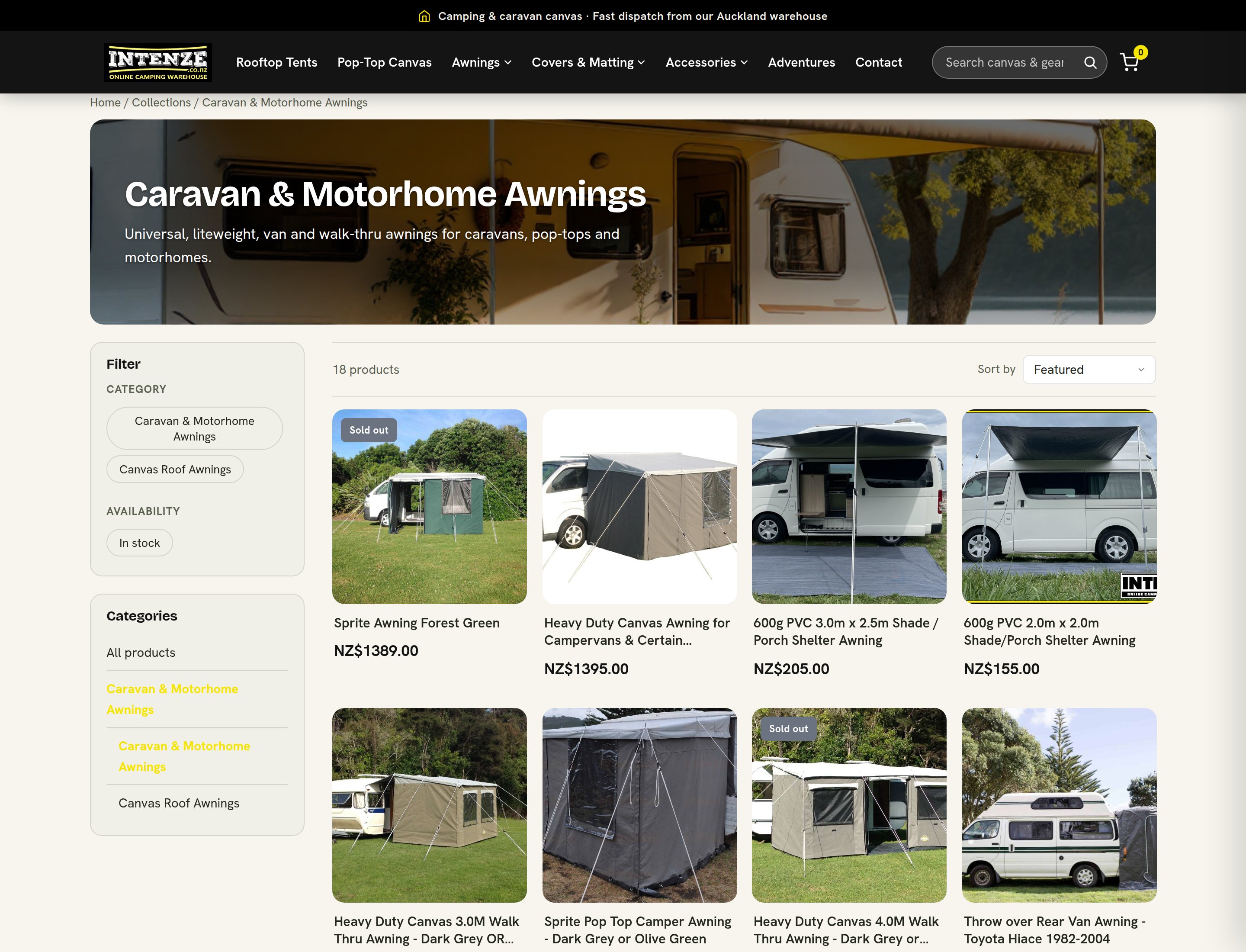
A collection page. Price and availability filters, the full category tree and the product grid all come from the platform, with the category structure carried over from the old store rather than rebuilt from memory.
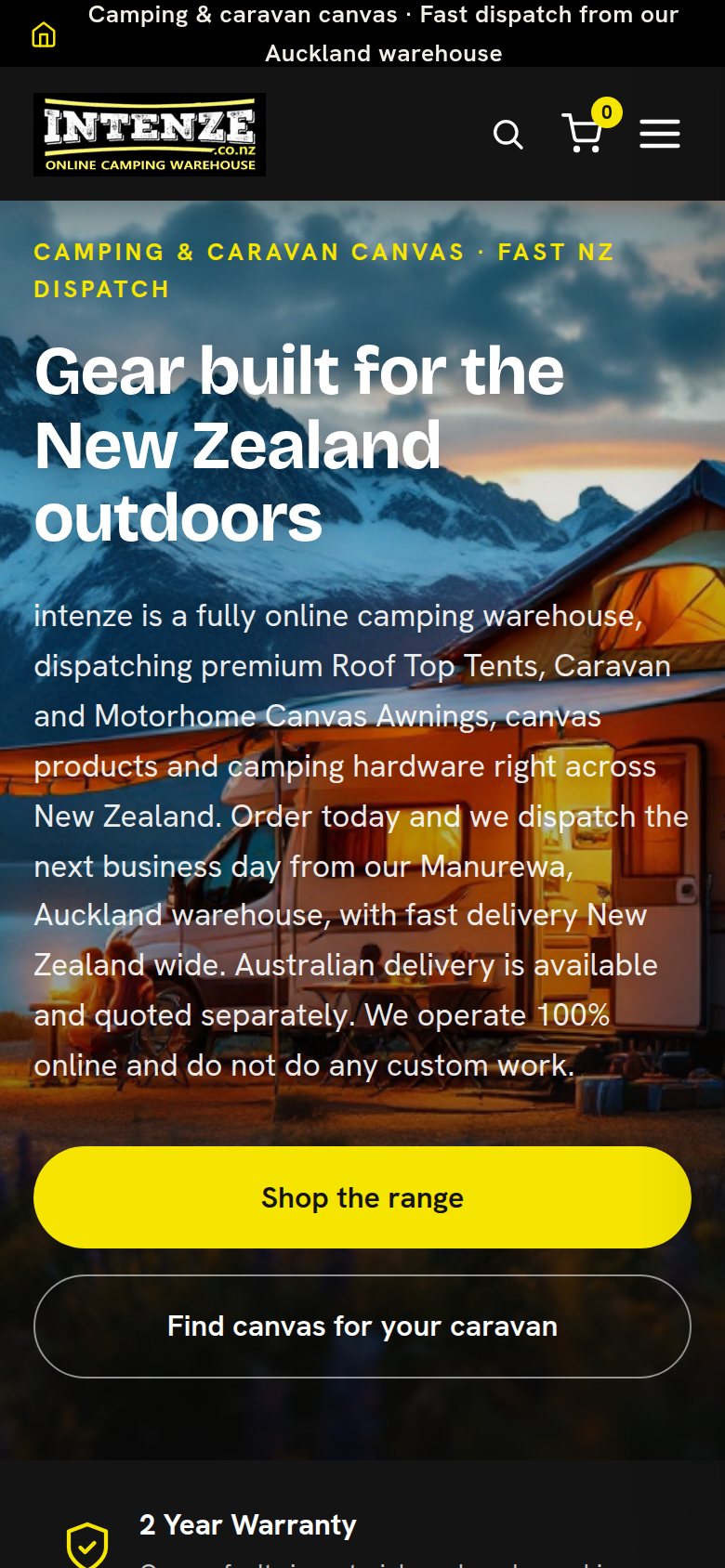
The same homepage at 390 pixels wide. Full width buttons, readable body text and nothing scrolling sideways, which matters for a shop people browse from a campsite.
A WooCommerce store held together by plugins.
Intenze arrived on WooCommerce, which is the arrangement most independent New Zealand retailers end up with: the shop itself is free, and then every single thing the shop needs it to do is a plugin somebody has to choose, pay for, configure and keep updated. Filters are a plugin. A notice on the homepage is a plugin. Getting an order to a courier is a plugin, and when one of them stops working after an update it is the owner, not a vendor, who finds out.
A canvas business also has an awkward catalogue. Awnings, replacement pop-top canvas, covers and poles come in sizes and fits that customers match against a specific vehicle, so the product structure and the category tree are doing real work, not decoration. Everything had to come across intact: products with their variants and images, collections, and the page addresses that search engines and forum posts already point at. A migration that quietly loses half of that has not moved the shop, it has restarted it.
A shop, and the machinery behind it.
The catalogue, moved rather than rebuilt
Products, variants, images and the category structure came across from WooCommerce as a body of data, not as a to do list for somebody with a keyboard. Collection pages, filtering by price and availability, and search all read the same catalogue, so a product that changes changes everywhere at once instead of in the four places a plugin stack would have cached it.
Checkout and orders from the platform
Cart, checkout, card payments through Stripe, order management and the emails a customer receives are all part of the platform rather than four separate extensions. Order confirmations and dispatch notices go out in the shop's name and colours, and the address a customer replies to is a setting, which turns out to matter more than anyone expects.
Dispatch without retyping an address
A paid order is handed to the courier system by itself. The consignment comes back, the order moves to fulfilled and the customer gets a tracking email in the shop's own branding. Nobody opens two tabs and copies a street address from one into the other, which is the single most error prone minute in a small retailer's day and the one that costs a redelivery fee when it goes wrong.
Store notices as a setting
When the shop needs to tell every visitor something, a closure, a dispatch pause, a change to the way orders are handled, that is a notice with a message and an end date, not a plugin to install and later remember to remove. It shows once per visit, it works on a phone, and it switches itself off on the date it was given.
What happens when this shop asks for something.
This is the part that does not fit in a feature list. On a plugin stack each of these is an afternoon of searching, installing and testing. Here it is a message, and then it is done.
A mailbox that no longer exists
The ask. One of the shop's mailboxes was shut down and could not be reached any more. It was still printed on the contact page, still the reply address on order confirmations and dispatch notices, and still receiving the copies of every new order.
What we did. We changed it everywhere in one pass: the public pages, the reply address on every transactional email the store sends, and the internal notification copies. A customer replying to a dispatch email now reaches somebody, which is the sort of thing that fails silently for months on a plugin stack.
Closed for a week, still taking orders
The ask. The shop was closing for a stretch and wanted every arriving visitor told, in the owner's own wording: orders are still welcome, they will not be sent until the shop reopens. Not a banner nobody reads, and not a closed shop either.
What we did. The notice went live the next day, with the shop's wording kept as written. It appeared once per visit, worked on a phone, and turned itself off at midnight on the reopening date, so nobody had to remember to take it down.
The first store on our shipping app
The ask. Parcels were being booked by hand, one order at a time, in a courier portal that had no idea the website existed. The shop wanted the two ends joined and was willing to be the first store to run it in production.
What we did. We built the Shipping app on the platform and connected this store to Starshipit, which puts most New Zealand and Australian couriers within reach. Orders go out, tracking comes back, the customer is told. Every store on WebForger can switch it on now because this one asked first.
Two of ours are running on this store.
Every app on the platform is included on every site at no monthly fee. This shop switched on the two that deal in getting the order out and telling people what is going on.
Shipping
FREE
The link between a paid order and whatever is printing the labels. This store runs the Starshipit connection: the order is pushed, the consignment number comes back, the order marks itself fulfilled and the tracking email goes out in the shop's name.
Announcements
FREE
Site wide notices, as a banner or a popup, with their own start and end dates. Written once in the dashboard, shown to arriving visitors on any device, and retired automatically when the date passes rather than when somebody remembers.
Running a store on WooCommerce?
If your filters, your shipping, your notices and your backups are four separate extensions from four separate authors, and keeping them working is a job nobody gave you, the whole lot can come across as one system with one place to change things. Tell us what you sell, how many products are in the catalogue and which plugins you are currently paying for. WebForger is invite only, so the first step is a short application rather than a signup form.