Add subscriptions to your website
FREE Included with every WebForger site
Offer subscribe and save on the products people buy again, bill every delivery automatically, and let customers skip, pause or change their own subscription without emailing you. It is built into the store you already run on WebForger, so there is no subscription app to rent, no monthly fee and no percentage taken from every renewal.

What your customers and your team see.
Screenshots taken from the WebForger store we use for testing, which is why the product is called Test Widget. Nothing below is a mockup or a design concept.
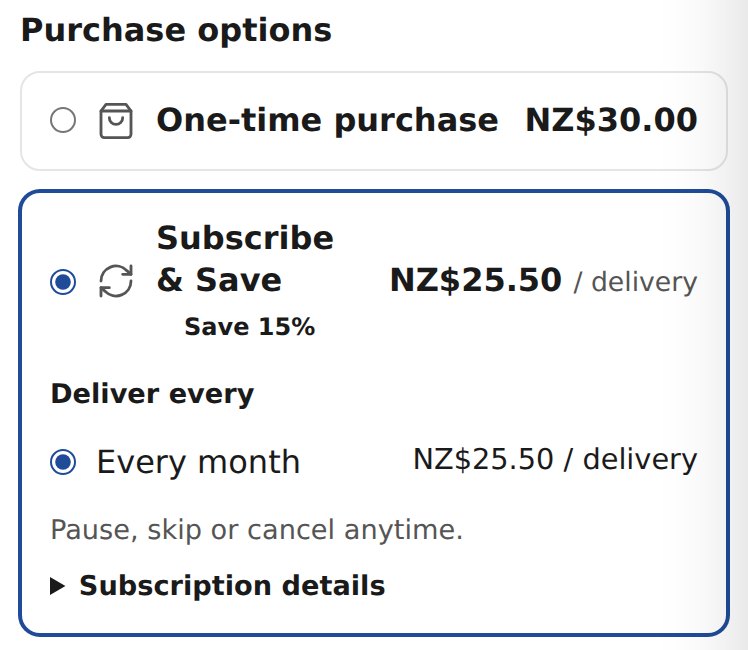
Purchase options sit right above Add to cart, with the subscription price per delivery worked out for the shopper.
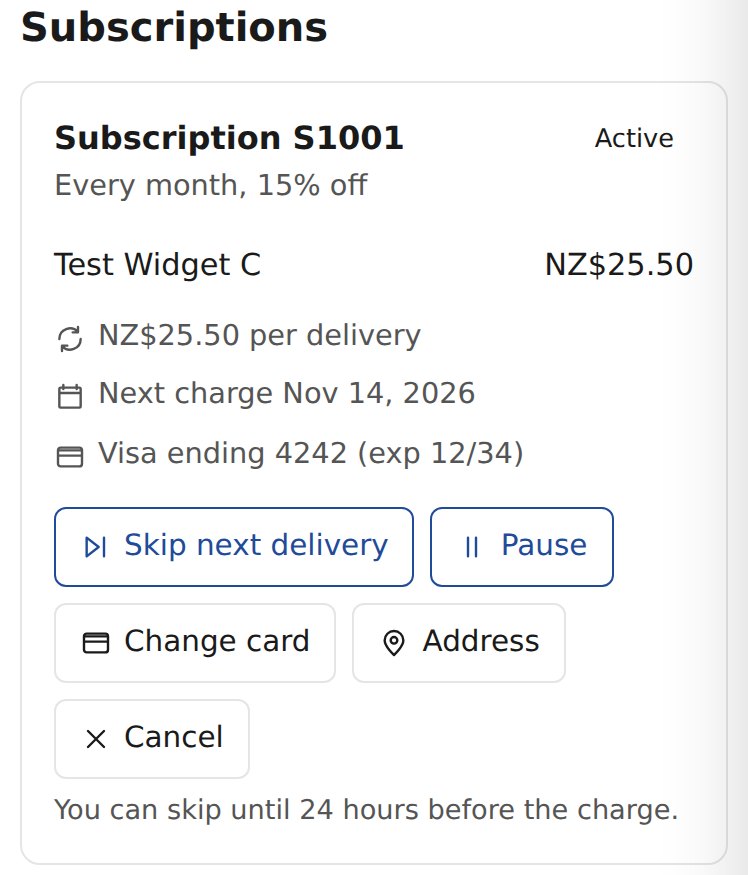
The customer's own account shows the next charge, the card on file and every change they are allowed to make.
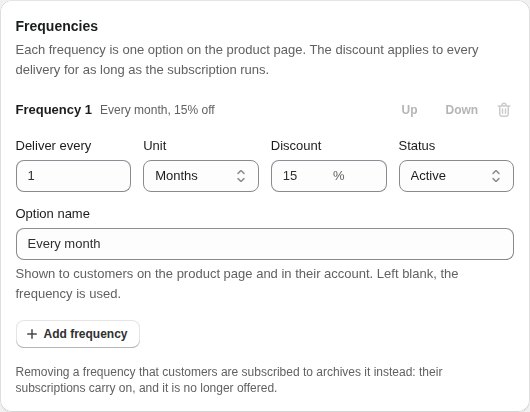
Setting it up is one form: how often, how much off, and which products it applies to.
Your best customers already buy the same thing every month.
Coffee, supplements, hair care, pet food, filters, anything that runs out. A customer who reorders on their own is good. A customer who never has to remember to reorder is better, because the order no longer depends on them noticing the bottle is empty before they notice a competitor's ad. Subscribe and save is the simplest way to make that trade: a modest discount in return for a standing order.
On most platforms that trade arrives with a bill attached. Subscriptions are an add on, the add on has its own monthly fee, and on top of that it takes a slice of every renewal for as long as the customer stays. The better the program works, the more it costs. We built subscriptions into the store itself, so a renewal costs you what any other order costs you.
- Every renewal is an ordinary order. It lands in your orders list with its items, address and payment like any other sale, so packing, shipping and reporting work the way they already do.
- The price a customer signed up at is the price they keep paying. If you change a catalogue price, existing subscribers are not surprised by it on their next charge.
- Customers manage it themselves. Skipping a month, pausing, changing frequency or swapping a card happens in their account, not in your inbox.
- A declined card is not a lost customer. Failed renewals are retried on a schedule and the customer is emailed with a link to fix it, which recovers most of what would otherwise quietly churn.
- The money arrives in your own payment account. Renewals are charged through the same account that takes your one off orders, with no extra party standing between you and the payout.
You decide how often and how much off. The store does the rest.
Delivery frequencies
A selling plan is a set of frequencies you offer, such as every month and every two months, each counted in days, weeks or months. Every frequency becomes one choice on the product page under a label you write, like Deliver every. Retire a frequency and the customers already on it carry on, while new shoppers simply stop seeing it.
Discount tiers
Each frequency carries its own percentage discount, and it applies to every delivery for as long as the subscription runs, not just the first box. Run several plans side by side, for example 15 percent off monthly on single products and 20 percent off every two months on a bundle, and assign each one to whole products or to specific variants.
Automatic recurring billing
The card saved at the first checkout is charged on each renewal date, and the customer gets a reminder before it happens. When a charge fails, the store retries it after one, three and seven days and emails the customer each time with a link to update their card. If a product is out of stock on renewal day, the renewal is retried daily for up to a week while you restock, and the customer is told about the delay.
Part of your store, not beside it
The purchase options are rendered into the product page on our servers, not injected by a script after it loads. Tax, shipping and stock are worked out by the same checkout that handles every other order, and your dashboard lists every subscription with its status, its next charge and its history, so nothing about it lives in a separate tool.
Customers change their own subscription. You do not hear about it.
Everything below happens in the customer's account on your site, after they sign in with their email. Each change takes effect immediately and shows up in your dashboard.
Skip a delivery
Away next month or still have plenty left? One button moves the next charge on by a cycle, up to a day before it is due.
Pause and resume
A pause keeps the subscription and its price intact without charging anything, and resuming picks it straight back up.
Change frequency
Customers can move between the frequencies you offer, from monthly to every two months for example, rather than cancelling because the timing was wrong.
Update the card
A new card can be saved for one subscription or for all of them at once, and an overdue payment can be settled there and then.
Change the address
Moved house? The next delivery goes to the new address without anyone editing an order by hand.
Cancel honestly
Cancelling is a button, not a phone call. Customers can tell you why in one tap, which is the most useful feedback the program will ever give you.
A subscription app you rent, or one that is already there.
A typical third party subscription app
A monthly subscription fee for the app itself, often tiered by how many subscribers you have.
A transaction fee on top, commonly around 1 percent of every subscription order, for as long as the customer stays.
Another vendor, another login and another support queue when a renewal goes wrong.
A widget loaded onto your product page by an outside script.
WebForger Subscriptions
No app fee. Subscriptions are included with every WebForger site.
No per order fee from us on first orders or renewals. Card processing is charged by your payment provider, exactly as on any other order.
One team built the store and the subscriptions, so there is one place to ask.
Purchase options rendered into the page itself, with no extra script.
On a store renewing 500 subscription orders a month at 40 dollars, a 1 percent fee alone is 200 dollars a month before the app's own subscription. That is the line item this page removes.
Three steps, and two of them are ours.
We switch it on
Tell us which products should be available on subscription, how often and at what discount. We enable the app and set up the first plan with you, usually the same day.
Customers subscribe
Subscribe and save appears next to the one time price on those product pages. The customer picks a frequency, checks out once, and their card is saved for the renewals.
Renewals arrive on their own
Each renewal date the store charges the card and creates the order. You pack it like any other, and the customer manages skips and changes from their account.
What people ask before adding subscriptions.
Can I sell subscriptions without Shopify?
How do subscription discounts work?
What happens when a customer's card is declined?
Is there a fee on each subscription order?
Can customers skip, pause or cancel on their own?
Can I offer both one time purchase and subscribe and save?
Two more apps for stores that sell again.
Every app on the platform is included on every site at no monthly fee.
Shipping
FREE
Paid orders pushed straight into your Starshipit account, with tracking numbers written back to the order. Renewals are ordinary paid orders, so a subscription box ships through the same flow as everything else.
Campaigns
FREE
Email marketing that reads your subscribers straight from the store. Tell the customers who have bought before that subscribe and save exists, with the products and prices filled in for you.
Turn the reorder into a standing order.
WebForger is invite only, so the first step is a short application rather than a signup form. Tell us what you sell, which products people buy again and what your current subscription app costs you each month. If we are not the right fit we will say so, and you will still leave with a straight answer.