Booking
FREE Included with every WebForger site
Customers pick a service and a time on your site and send you a request. You approve or decline it in one click, and the platform handles every email that follows. It is an appointment request book rather than an open calendar, which is what most service businesses actually want: you still decide who gets the slot.

What a customer actually sees.
Screenshots taken from the live booking page of a private hibachi catering company whose site runs on WebForger. The widget takes its type, colours and corners from the site around it, so it never looks like a panel somebody pasted in.
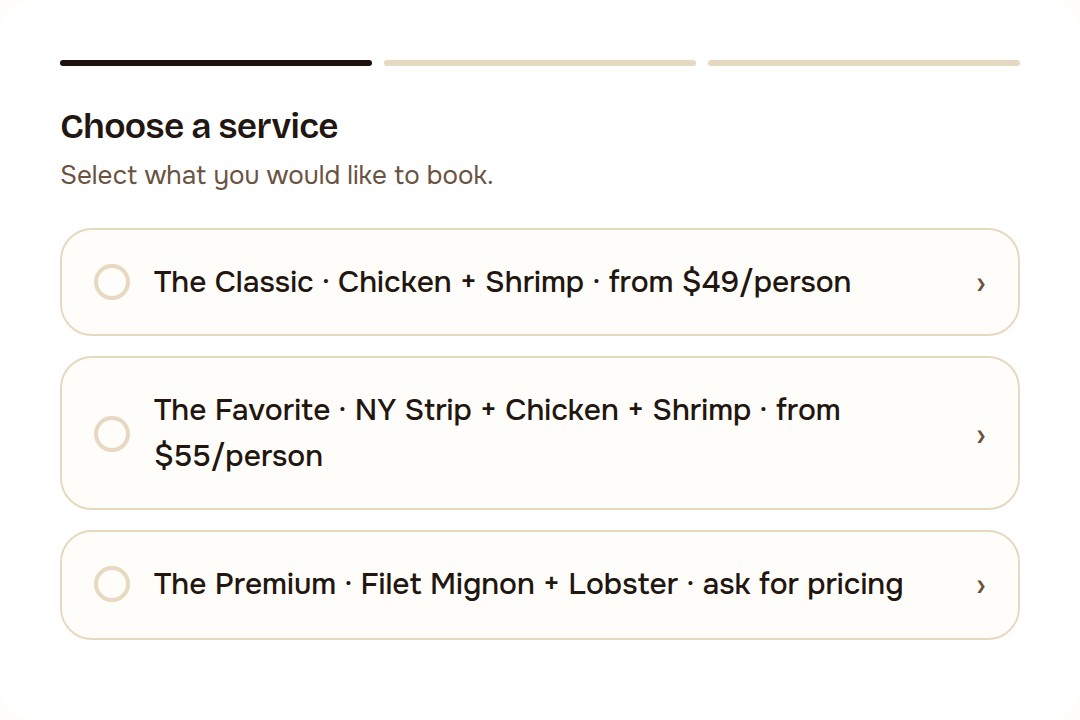
Service selection. Each service carries its own duration and price, and a site with one service skips this step entirely.
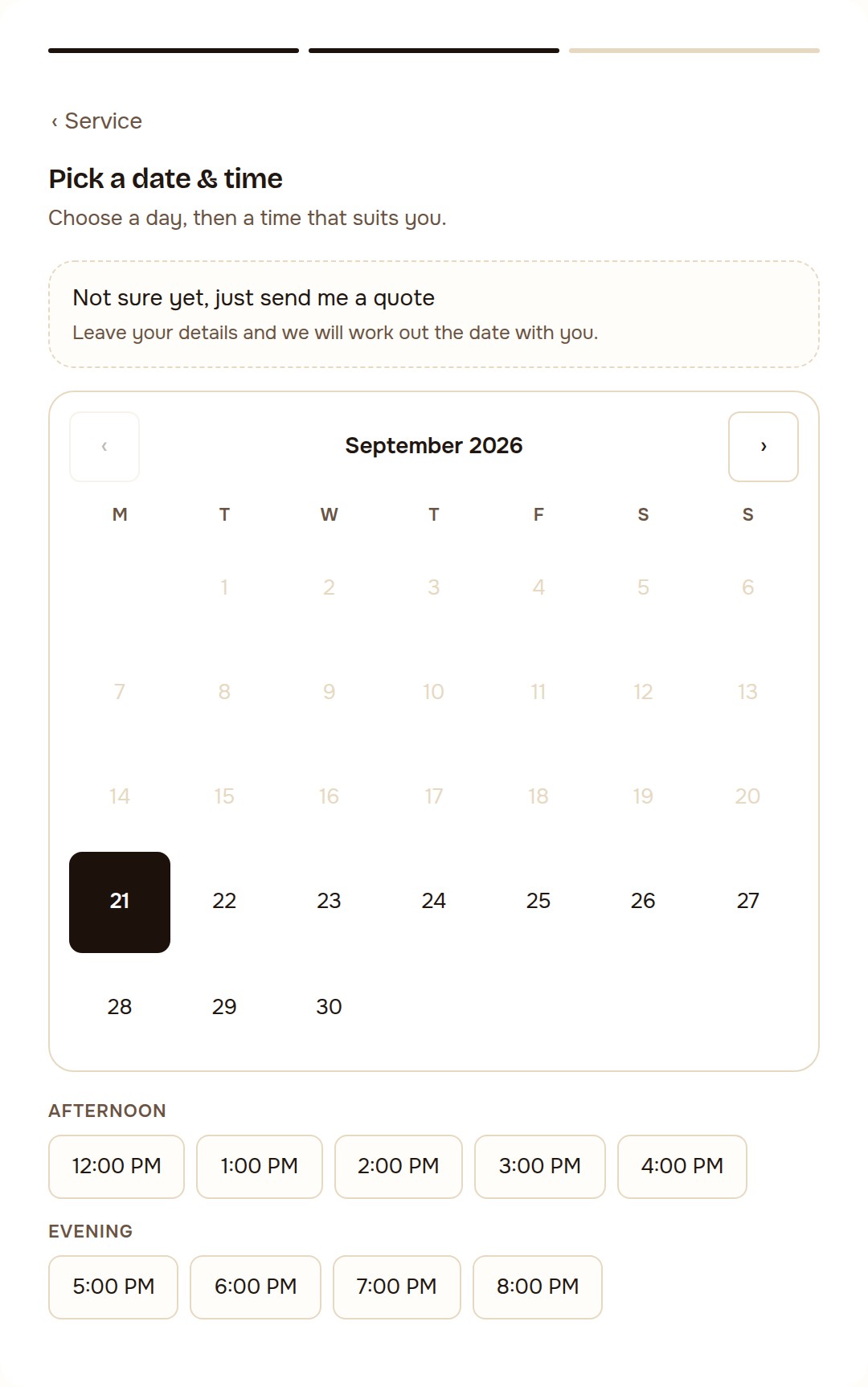
Date and time. Days outside your opening hours, closed dates and anything inside your minimum notice window are not offered. Times are grouped so the list stays readable on a phone.
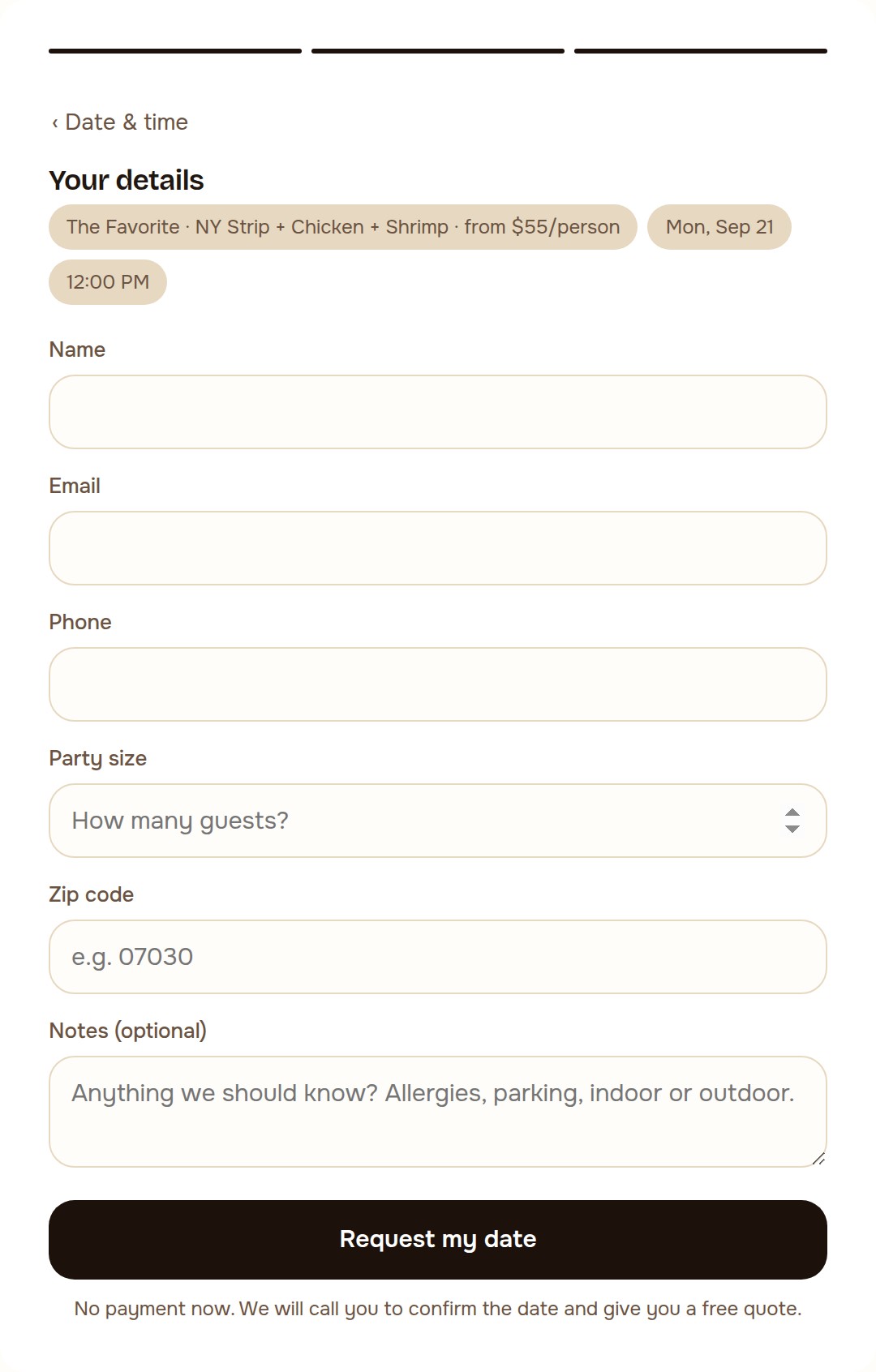
Details. Party size and postcode here are questions this business added; you define your own, and the answers arrive in the request rather than in a follow up phone call.
The booking you never answered is the job you never got.
Most service businesses lose work in the gap between somebody wanting an appointment and somebody being able to give them one. The enquiry arrives at nine at night, the phone is off, and by lunchtime the next day they have booked the place that answered. A contact form does not close that gap, because a contact form still needs you to write back before anything is agreed.
The usual fix is a calendar app that publishes your diary and lets strangers take whatever is free. That suits a barber and terrifies a caterer, a clinic or anyone whose jobs are not all the same size. This app sits in the middle. The customer commits to a specific service, day and time, and you keep the last word, which takes one thumb press from the email on your phone.
- You approve, not the calendar. Every request arrives as a request. Nobody books your Saturday from your website without you agreeing to it, and declining is one click rather than an awkward phone call.
- The reply is written for you. Confirmations, declines and cancellations all go out as proper emails in your business name the moment you decide. There is no template to keep, no wording to think about at eleven at night.
- Nothing sits in limbo. A request you never answered is cancelled on its own after the number of hours you set, the customer is told, and the slot goes back on sale instead of quietly blocking your diary.
- You can ask your own questions. Party size, postcode, number of pets, registration plate. Whatever you would otherwise ring back to find out becomes a field on the form, and the answer arrives with the request.
- Advertising finally has something to count. A booking request is a conversion with a real name attached, and it is reported back to Google Ads as one, so the bidding learns which clicks turn into work rather than which clicks are cheap.
Four jobs, and only one of them needs you.
Take the request
Three steps on the page: service, date and time, details. The times on offer come from your opening hours for that weekday, your slot length, your closed dates and any individual slots you have blocked, all of it in your own timezone. You can set a minimum notice period so nobody books you for forty minutes from now, and turn on a "not sure yet" option so a customer who cannot commit to a date still leaves their details instead of leaving.
Approve it in one click
You get an email with the whole request in it and a Confirm and a Decline button. Pressing one is the decision: no login, no app, no dashboard, and it works from a phone on a job site. The links are signed and expire, so a forwarded email cannot be used to confirm anything later. If you would rather keep approvals inside the dashboard, the buttons can be switched off and the email becomes a plain notification.
Close the loop
The customer is emailed whichever way you decide, with the service, date and time spelled out and a link that lets them cancel themselves up to a cutoff you choose. An hourly sweep cancels requests that have been sitting unanswered past your limit and any slot whose start time has already gone by, tells both sides, and frees the time. Nothing in the diary is there because somebody forgot about it.
Report the conversion
The widget keeps the Google click identifier that brought the visitor in, so a submitted request can be uploaded to Google Ads as an offline conversion rather than guessed at from form views. A submission also pushes an event into your tag manager and analytics at the moment it happens, which is what lets you see which campaign, which page and which service produced the work.
Three steps, and two of them are ours.
We set up your diary
Tell us your services, your opening hours, how long a slot is and how much notice you need. We switch the app on and put the booking panel on whichever page you want it, usually the same day.
A customer asks for a time
They pick a service, a day and a time that you are actually open for, answer your questions and send it. The request lands in your inbox and in your dashboard within seconds, at whatever hour they happened to be browsing.
You press one button
Confirm or decline. The customer is emailed either way, the booking is recorded against the slot, and if it came from an ad the conversion goes back to Google Ads. If you never press anything, it cancels itself and says so.
What people ask before turning it on.
Is the booking app really free?
Does it publish my calendar to the whole internet?
What happens if I am on a job and do not see the email for two days?
Can the customer cancel or change their booking themselves?
Do bookings count as conversions in Google Ads?
Two more apps that work on the same problem.
Every app on the platform is included on every site at no monthly fee.
Rental Booking
FREE
The same idea for things rather than appointments. The customer books a date range, the calendar knows what is already out, and turnaround days are held back automatically. Use it when what you are selling is a period of time with an object attached.
Leads Flux
FREE
Contact form submissions sorted into genuine enquiries, sales pitches and junk, with a first reply drafted from your own pages for the real ones. Nothing is sent until you have read it and approved it.
Let people book you at eleven at night.
WebForger is invite only, so the first step is a short application rather than a signup form. Tell us what you do, how you take appointments today and what happens to the enquiries that arrive after hours. If we are not the right fit we will say so, and you will still leave with a straight answer.