Leads Flux
FREE Included with every WebForger site
Every contact form submission is sorted into a genuine enquiry, somebody selling you something, or junk, and only the genuine ones reach your inbox. For those, a first reply is drafted from the facts already on your own pages and sent to you for approval. Nothing goes to a customer until you have read it and pressed the button.
Three screens, and the last one is the whole argument.
Real enquiries belong to the businesses that received them, so every name, address and message below is a placeholder. The screens themselves are the ones the app puts in front of you.
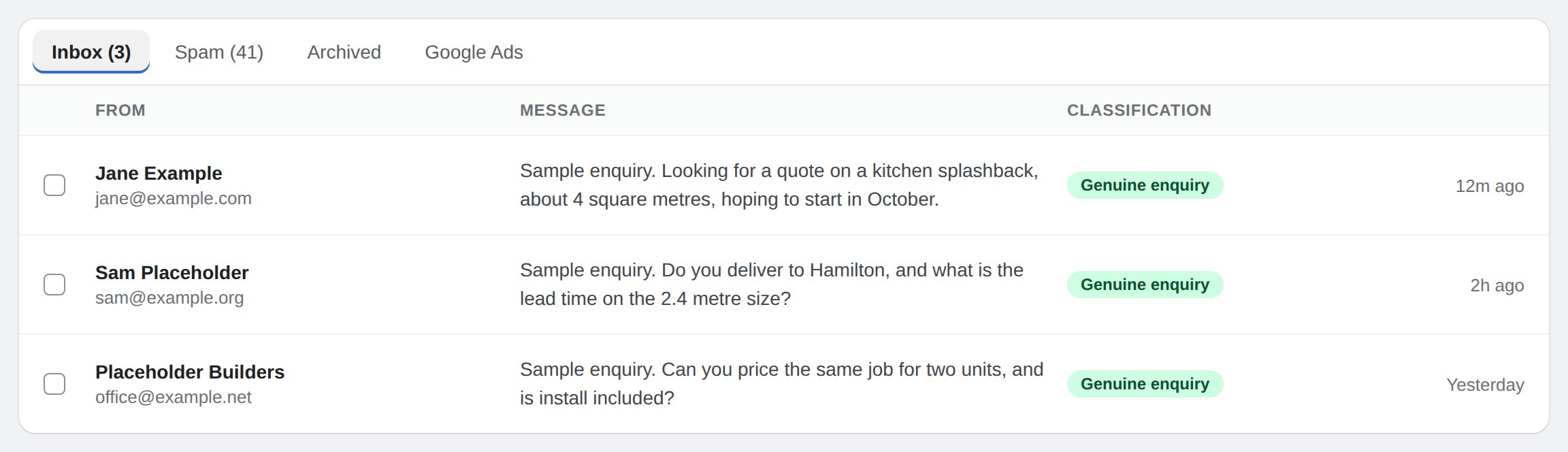
Interface preview with placeholder enquiries. The inbox holds only what was judged to be a real customer, so the count at the top is a number worth looking at.
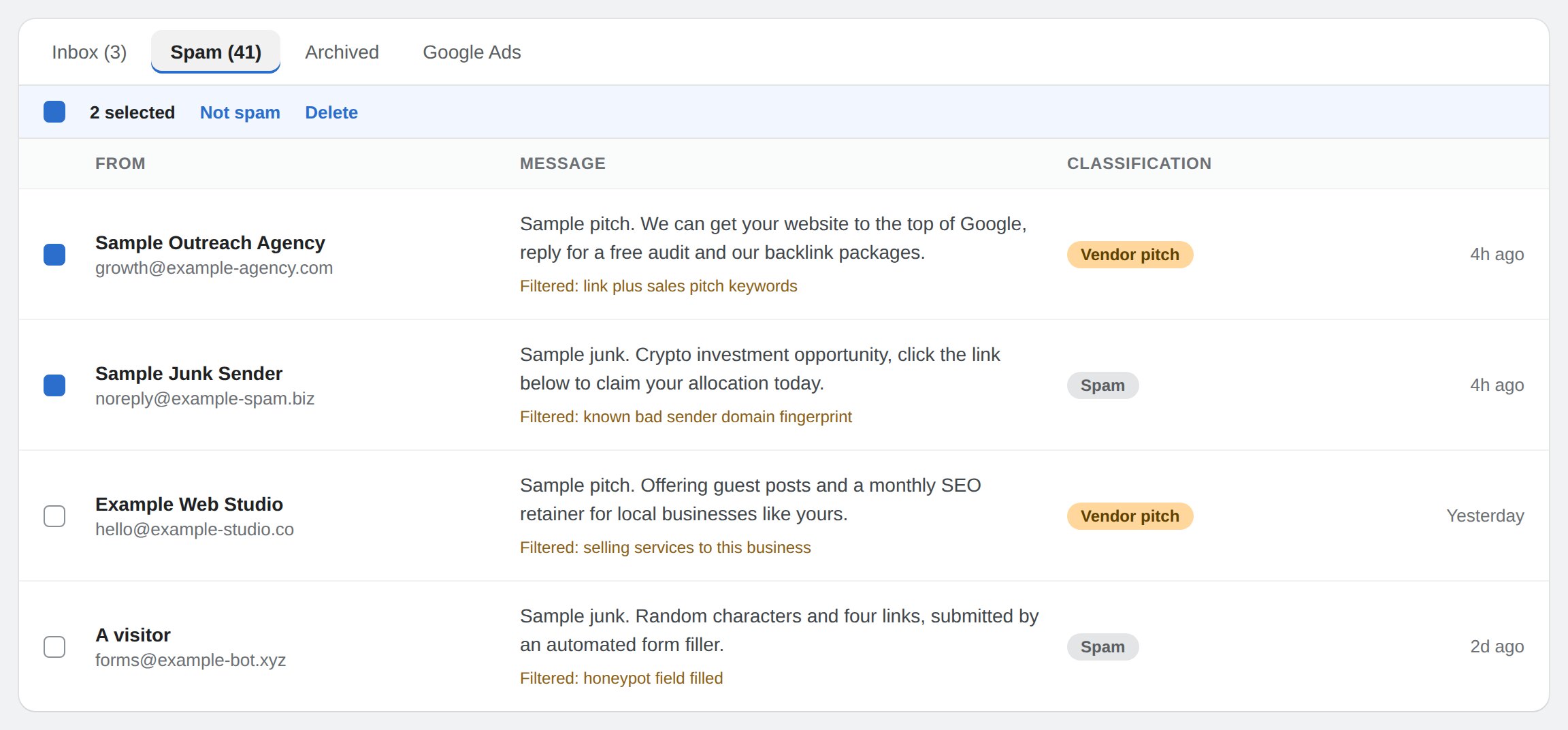
Interface preview with placeholder submissions. Everything filtered is kept with the reason it was held, so you can check the decision rather than trust it. Not spam moves one back and teaches the filter at the same time.
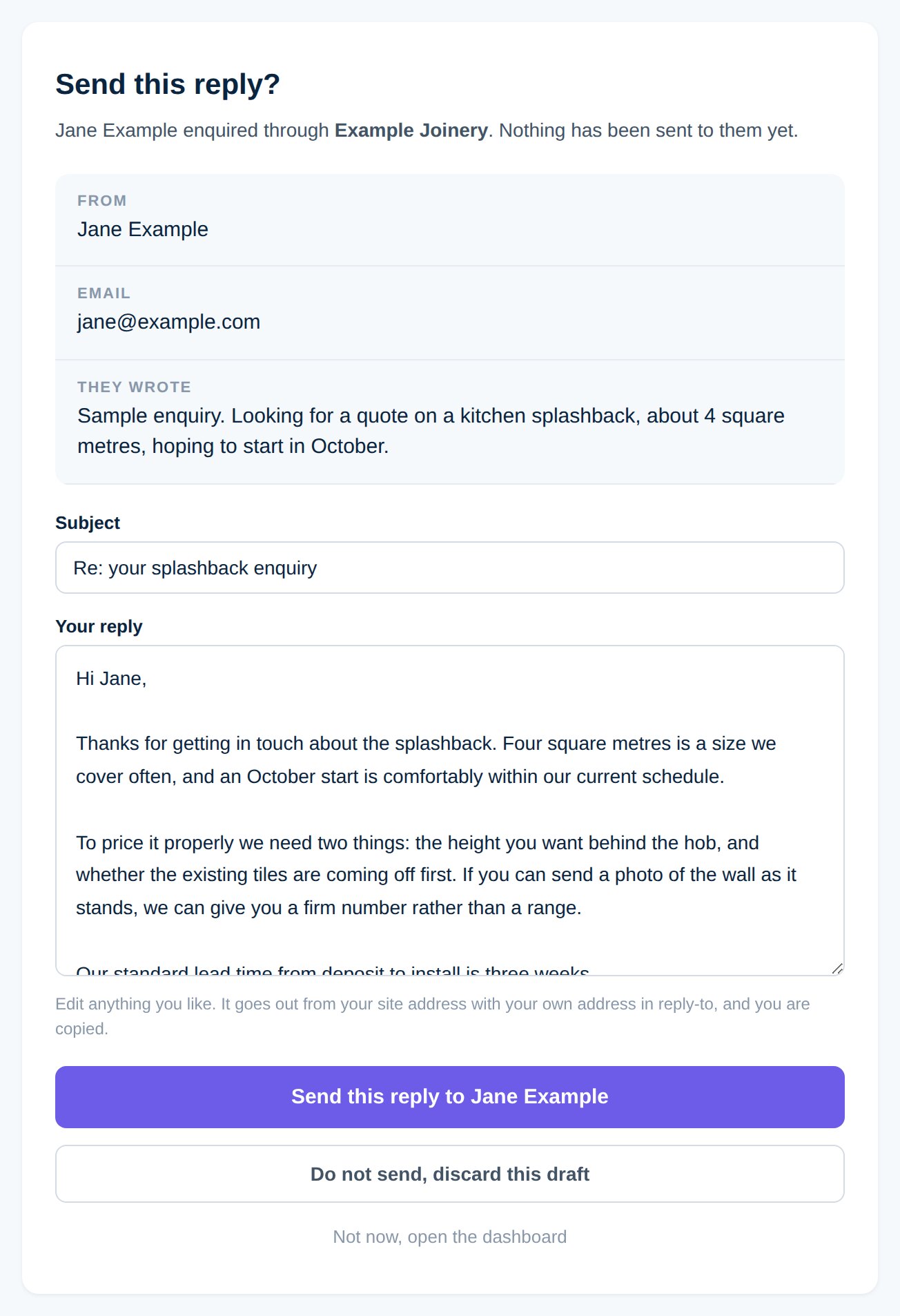
Interface preview with a placeholder enquiry. This is the gate: the drafted reply arrives in your own inbox, the text is editable, and it leaves only when you press send or a teammate does. Opening the link sends nothing.
The job usually goes to whoever answered first.
Two things happen to a small business contact form. It fills up with agencies selling search rankings, backlinks and web design, until the owner stops opening the notifications. And the real enquiries that are buried in there sit for a day and a half, because answering properly means finding the price list, remembering the lead time and writing four paragraphs on a phone between jobs. By then the customer has three other quotes.
Leads Flux attacks both ends. The pitches and the junk are held back so the inbox is worth opening again, and for the enquiries that are real it writes the first reply using the facts already published on your own site, then hands it to you. You read it, change what you want and send it, or throw it away. The speed comes from the draft already existing, not from a machine deciding on its own what to promise a customer in your name.
- A person approves every reply before it exists for the customer. The draft is written for you and mailed to you. Opening the link only shows it. One deliberate press from you or your team is the only thing that ever puts a message in front of an enquirer.
- Filtered does not mean deleted. Quarantined submissions are kept with the reason they were held, in their own tab, and one click puts a wrongly judged one back in the inbox. A filter you cannot audit is a filter you cannot trust with the enquiry that pays for your month.
- When it cannot decide, it delivers. An uncertain submission is treated as a real customer, and a submission that arrived from an ad you paid for is delivered whatever the verdict. A leaked sales pitch costs you a second of attention. A dropped enquiry costs you the job.
- The draft answers from your pages, not from imagination. Prices, service areas, lead times and policies are read off the site you already published, and anything the customer did not tell you is asked for rather than assumed. A reply that invents a number is worse than no reply.
- It gets better at your business specifically. Marking one submission as spam or as a real customer is taken as a correction, not a one off tidy up, and it changes how the next one like it is judged on your site alone.
Four jobs between the form and your answer.
Sort every submission
Three passes, cheapest first. Obvious signals such as a filled honeypot field or a message that is mostly links. Then sender patterns already known to be bad. Then a reading of what the message actually says, against a short profile of what your business sells, which is what separates a customer asking about your services from an agency offering to sell you theirs.
Quarantine the rest
Pitches and junk go to their own tab with the reason attached, out of the notification you actually read. They are kept for a month so nothing real can vanish, and marking one as not spam both restores it and corrects the filter. Nothing that arrived from a paid ad click is ever quarantined.
Draft the first reply
For a genuine enquiry the app works out what was asked and what is missing, then writes a reply from your own pages: it answers what it can, asks for the quantity, dates or address it needs, and signs off in your business name. The draft is emailed to you, and also waits in the dashboard for whoever gets there first.
Hold it until you say so
The reply sits as a draft until a person sends it. You can edit any of it first, discard it, or ignore it entirely, and the customer never knows a draft existed. The reply leaves under your business name with your own address in reply to, so their answer comes back to you and the conversation continues where it should.
Three steps, and the decision stays yours.
Somebody fills in your form
Any form on the site, whatever its fields are called. The submission is judged in the seconds after it arrives, and a real one lands in your inbox and your notification exactly as it would have without the app.
A reply is written for you
If drafting is switched on for your site, the enquiry comes with a proposed answer built from your own pages, with the missing details already asked for. If it cannot answer usefully it says so and offers no draft rather than padding one out.
You read it and send it
Edit it, send it as it is, or discard it. The customer gets an answer from your business within minutes instead of the next evening, and every send, edit and dismissal is recorded so you can see who dealt with what.
What people ask before turning it on.
Does it answer customers automatically?
What if it filters a real customer?
Where does the drafted reply get its facts?
Is the enquiry text ever treated as an instruction?
Is Leads Flux really free, and who is it for?
Two more apps for the enquiry side of the site.
Every app on the platform is included on every site at no monthly fee.
Booking
FREE
Appointment requests taken on the site against the hours you actually work, with a confirm or decline link in your email and a cancel link in theirs. The enquiries Leads Flux hands you are often asking for a time, and this is where that ends.
Announcements
FREE
A site wide bar or popup for a closure, a sale or a shipping cut off, with an end date so it retires itself. The fastest way to stop answering the same question in every reply.
Answer the real ones first, and answer them today.
WebForger is invite only, so the first step is a short application rather than a signup form. Tell us what your business does, roughly how many enquiries a week your form takes and how much of it is agencies selling you things. If we are not the right fit we will say so, and you will still leave with a straight answer.